Pages

Showing posts with label Cutsomized Controls. Show all posts

Tuesday, July 14, 2009

Color Picker ASP.NET AJAX Extender Control

I was looking for a client-side color picker control and found it extremely difficult to find something that would satisfy to my requirements. I have found plenty of pure JavaScript controls written on very different levels of proficiency and there was even one ASP.NET color-picker control that I almost liked but still my major requirement was not satisfied: I was looking for AJAX .NET Extender control - easy to use and based on a solid and proven platform.

So I have researched what other color picker controls do and decided to write the one myself that I would base on Microsoft AJAX .NET platform. After some considerations I've decided to go even further and build an AJAX Control Toolkit Extender control.

As an example I took an AJAX Control Toolkit Calendar extender and in my Color Picker extender control I also internally used another AJAX Control Toolkit control: Popup extender.

So what are the advantages of implementing a client control as an ASP.NET AJAX extender?

  1. You use ASP.NET page mark-up to render the control content to the browser.
  2. No need to manually inject JavaScript, HTML and other resources.
  3. You develop JavaScript code in a standalone file leveraging ASP.NET AJAX framework and Visual Studio intellisense abilities.
  4. JavaScript per se is very well structured, easy to read and debug.
  5. Many of the hassles of JavaScript client coding such as cross-browser compatibility, event handling, asynchronous calls are taken care of by ASP.NET AJAX framework.

So I have spent a few days coding the control and finally it's out there. I have created a Codeplex project for it so if you are interested just go there and download the control and a Demo Web site.

Now just a few more words about the extender. First, this is how it looks:

Second, it's extremely easy to use. The extender attaches to an ASP.NET TextBox server control and to an optional button that can open a popup window and an element that samples a selected color in the background. User selects a color by clicking on a colored area. Below is a code example of using an extender on an ASP.NET page.

    <asp:TextBox ID="TextBox1" runat="server" Columns="7" MaxLength="7">asp:TextBox>
<asp:ImageButton ID="ImageButton1" runat="server" ImageUrl="~/Images/icon_colorpicker.gif" />
<cdt:ColorPickerExtender ID="cpe" runat="server"
TargetControlID="TextBox1"
SampleControlID="ImageButton1"
PopupButtonID="ImageButton1"
/>

Feel free to download the extender from the Codeplex, try it and post any comments or suggestions on the Codeplex project page.

Monday, June 22, 2009

Howto: Create a Custom Control in ASP.NET (C#)

Creating custom controls can save you a lot of time and effort when building an application. The built-in sever controls provided can do just about anything you need them to, but sometimes it takes a great deal of coding (hacking) to make it do exactly what you want it to do. Consider the possibility that you need a textbox control that you would like to be able to assign a readony property to it so it either renders as a regular textbox if false or plain text if true.

You may also want a textbox that will cause it's on "OnTextChanged" to bubble up in the "GridViewCommandEvent" of a Gridview control. By default the textbox does not support that.

Click here for details .....

Friday, June 12, 2009

Creating a GridView with Resizable Column Headers

Before I get into the implementation details, here is a quick screen shot of the grid. Unfortunately the mouse cursor didn't come across in the screen shot, but when it is placed over the cell borders in the header row, it displays the east/west pointing arrow. Before I get into the implementation details, here is a quick screen shot of the grid.

Unfortunately the mouse cursor didn't come across in the screen shot, but when it is placed over the cell borders in the header row, it displays the east/west pointing arrow.

Adding this behavior to the existing GridView required implementing a handful of JavaScript functions. My approach for implementing this features was to do the following:

  1. Handle each of the header cells's mousemove events to determine when the user has the cursor placed roughly over the cell's right hand border. If a resize is already in processes then I use this event to determine what the new width of the column should be
  2. Handle each of the header cell's mousedown events to determine when the resizing begins
  3. Handle the document's mouseup event. When this occurs I make sure that the resize has stopped
  4. Handle the document's selectstart event. I cancel this event if a resize is currently in executing. Doing this make's sure that the header cell's text isn't highlighted when I am resizing the cell. I learned this trick from the AjaxControlToolkit's ResizeableControlExtender.

Download the Code

Monday, June 8, 2009

Freeze ASP.NET GridView Headers by Creating Client-Side Extenders

Lately We've been working on a pet project where I needed to freeze a GridView header so that it didn't move while the grid records were scrolled by an end user. After searching the Web we came across a lot of "pure" CSS ways to freeze a header. After researching them more they tend to rely on a lot of CSS hacks to do the job and require HTML to be structured in a custom way. We also found a lot of custom GridView classes (another one here), and more.

Some of the solutions were really good while others seemed a bit over the top and required a lot of custom C# or VB.NET code just to do something as simple as freezing a header. Freezing a header requires CSS and potentially JavaScript depending upon what needs done. Regardless if CSS or JavaScript are used, these are client-side technologies of course. We started to write our own derivative of the GridView class but quickly realized that it made more sense to use the standard GridView control and simply extend it from the client-side. An example of what we were after is shown next:


Click here for details .......

Wednesday, June 3, 2009

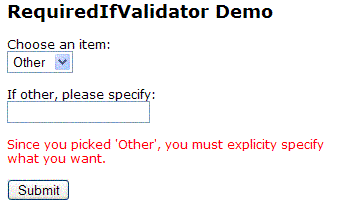
RequiredIfValidator - Extending from the BaseValidator class


When writing ASP.NET pages that need to be validated before submission, I find myself coming across controls that only need to be validated if another control contains a particular value. A classic example of this is an "If other, please specify" field. Typically, you'll have a combobox that contains a list of choices, and at the end of the list is an "Other" item. If the user chooses "Other", you'd like them to specify exactly what "Other" means.

Click here for details .......

Tuesday, June 2, 2009

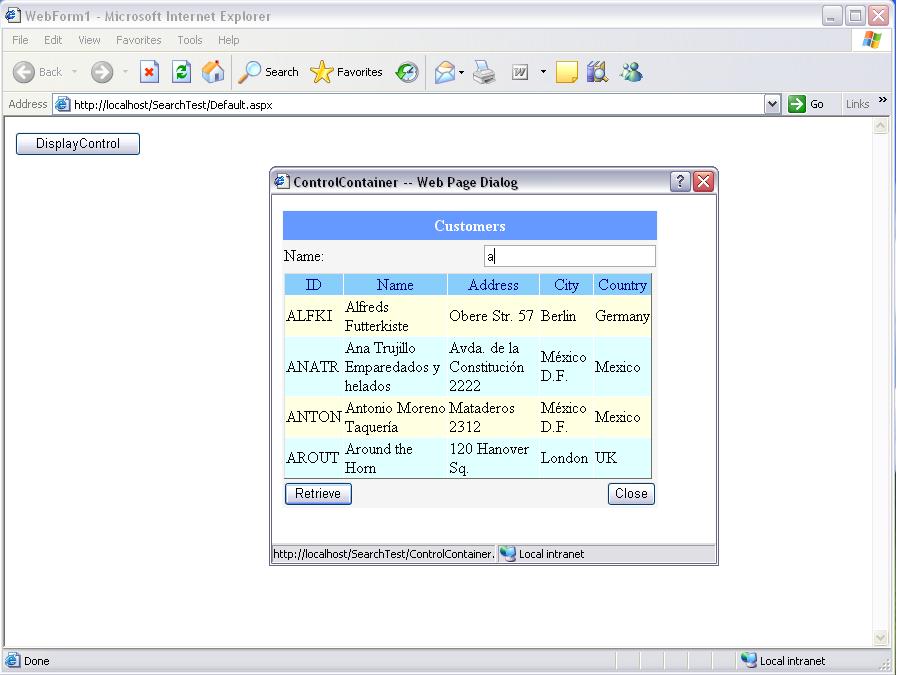
Generic Search Web User Control with event


This control provides a functionality to search a table based on the name column. The user interface uses DataGrid to display the records and the control fires an event trapped by the container to process the request.

Click here for details .....

Saturday, May 16, 2009

ASP.NET Ajax Grid and Pager

Today, learn how to create a custom AJAX Grid and Pager with the Microsoft ASP.NET AJAX platform.

Introduction

This article will show you how to create an AJAX Grid and a generic pager, which mimics the built-in GridView control on the client side.

Features

The Control(s) Provides:

  • Able to bind to any web service call that returns an array.
  • A GridView like API on the client side.
  • Able to AutoGenerate Columns based upon the dataSource.
  • Support for Sorting and Paging where developer can spawn his/her own logic.
  • Full VS Design Time Support.
  • Supports Column Drag and Drop.
  • Compatible with all major browsers including IE, Firefox, Opera and Safari.
Visit for more details ......

Wednesday, April 22, 2009

How to create a CustomValidator for testing for certain file types such as GIF or JPG Images

Click here to see that how to create a custom validator that checks that an uploaded file is either a Jpeg or Gif with client-side and server-side validation.