Pages

Showing posts with label Controls. Show all posts

Wednesday, June 10, 2009

Paging, Selecting, Deleting, and Editing in the ASP.NET 2.0 GridView Control with Keyboard Shortcuts

The ASP.NET 2.0 framework comes with the GridView, a feature-rich ASP.NET server control to display, page through, and edit data on a webpage. Paging, selecting, and editing of the GridView is achieved by declaratively adding properties to the markup of the GridView. This adds link buttons to the data rows of the GridView. You have to click on one of the link buttons to delete or edit a row. One feature I missed is the ability to use these features via keyboard shortcuts.

To achieve that, I developed an ASP.NET 2.0 AJAX Extensions Extender Control for use with ASP.NET 2.0 GridView on ASP.NET 2.0 AJAX enabled web pages.

GridViewKeyboardExtender_src

Click here for details ......

Wednesday, June 3, 2009

Generate an Image with a Random Number

We need to check if it is a real person who is registering on our Web site. So we decided to generate an image with a random code, hidden for robots, and feed it to the browser instead of a page response. We show it in our registration form, and let the user enter the code to check it.

Click here for details .....

Tuesday, June 2, 2009

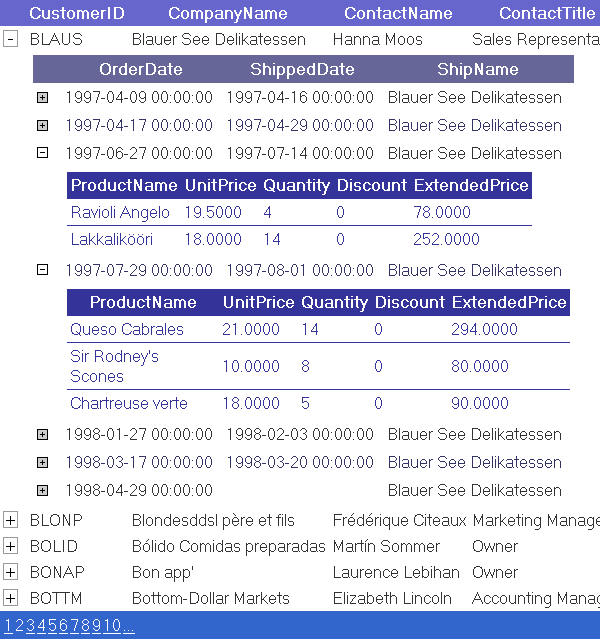
Displaying Collapisble Data in GridView

The code is intended to make a high performance GridView that has minimum postback operations, as well as has a collapsible client-side feature to show additional details for a row.

Click here for details .....

Monday, June 1, 2009

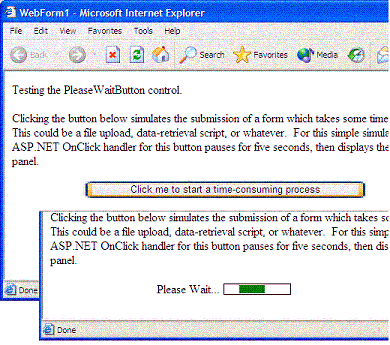
PleaseWaitButton ASP.NET Server Control


It is often useful upon a form submission in a web application to display a "please wait" message, or animated .gif image, particularly if the submission process lasts a few seconds or more. The application inserts the uploaded data from the spreadsheets into a database. The upload/insert process may only take a few seconds, but even a few seconds on the web is a noticeable wait.

When testing, some users clicked the upload button repeatedly; it was useful to provide a visual clue that the upload was underway. For that matter, it was useful to hide the upload button altogether, preventing multiple clicks. The control presented here, a subclass of the Button control, demonstrates how client-side JavaScript code encapsulated in an ASP.NET server control can provide such functionality conveniently.

Click here for details ......

Sunday, May 31, 2009

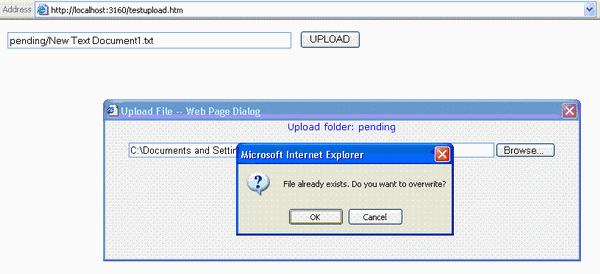
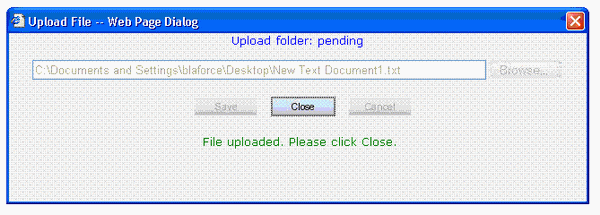
ASP.NET File Uploader with Overwrite Message

This ASP.NET application is a file uploader dialog box that can be called from classic ASP. It is designed for use in an intranet site. The file uploader displays an overwrite warning as a popup or a warning message. The overwritten file is archived with a time stamp appended to the filename. Checking if the file already exists turned out to be the biggest obstacle. The FileExists Java function uses an ActiveX control that causes browser security warnings. The workaround was to access a code-behind routine by calling AJAX Web Services.


Click here for details .....

Friday, May 29, 2009

Navigation Web User Control

Navigation Web User Control Derived from WebControl (dll). It creates navigations buttons at run time so the user can navigate on the data list or any other controls. The developer can change the alignment and separation text between links or show and hide first, last, previous and next links. This control gets his style from its container the developer just need PageIndexClick event to type his code when the page clicked and set paging count in page load.

Click here for details .....

Saturday, May 16, 2009

Create An Ajax Style File Upload

In this post, you will find that how to create Ajax like version of the file upload.

1.


2.


3.


Visit for more details .....

Sunday, May 10, 2009

Create Dynamic Image with Text

To avoid the spamming and to prevent hacking from your web forms, i am letting you to find out to create dynamic image with text. You can use it as CAPTCHA on your web forms.

Visit the place for details ......

Simple NumericTextBox Web custom control

Just a simple textbox control which allows only integer input using client-side javascript code. it also provides a property of type int, so that setting and getting the value of control can be made much easier.

Click here to get it ......

Saturday, May 9, 2009

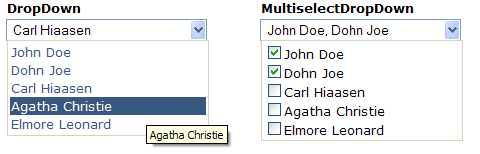
DropDown and MultiselectDropDown Controls for ASP.NET


This article discusses about two user controls written in ASP.NET. Working on a project recently, I needed to develop a custom DropDown control with multiselect options in the form of CheckBox. I searched around for something simple, yet useful for my needs, and I wasn't able to find anything, so I developed my own control. Later, I reused the code to create a regular DropDown control (no multiselect checkbox options). The two controls can be merged into one, but I might do that at a later stage. On to the controls.

Click here for details ......

Sunday, May 3, 2009

Hierarchical Data Using the GridView Control


This article presents a control which displays hierarchical data using the ASP.NET GridView control. This extension of the GridView control can also be used to display extended data details for a data row.

Click here for details .......

Thursday, April 30, 2009

CAPTCHA Image

CAPTCHA stands for "completely automated public Turing test to tell computers and humans apart." What it means is, a program that can tell humans from machines using some type of generated test. A test most people can easily pass but a computer program cannot.

You've probably encountered such tests when signing up for an online email or forum account. The form might include an image of distorted text, like that seen above, which you are required to type into a text field.

Click here for details ......

Free CAPTCHA ASP.NET Server Control

Key features of Mondor's Captcha ASP.NET 2.0 Server Control:
  • Ability to set any size for your captcha
  • Set alphabet and string length
  • Set the level of noise and line noise
  • Timer to make your captcha obsolete after specified period of time
  • Set various fonts for your captcha
Click here for details .....

Wednesday, April 29, 2009

Please Wait Button ASP.NET Server Control

It is often useful upon a form submission in a web application to display a "please wait" message, or animated .gif image, particularly if the submission process lasts a few seconds or more. I recently developed a survey submission application in which internal users upload excel spreadsheets through a web page. The application inserts the uploaded data from the spreadsheets into a database.

The upload/insert process may only take a few seconds, but even a few seconds on the web is a noticeable wait. When testing, some users clicked the upload button repeatedly; it was useful to provide a visual clue that the upload was underway. For that matter, it was useful to hide the upload button altogether, preventing multiple clicks. The control presented here, a subclass of the Button control, demonstrates how client-side JavaScript code encapsulated in an ASP.NET server control can provide such functionality conveniently.

Click here for details ......
Sunday, April 26, 2009

Free Progress Bar for ASP.NET

Feature Highlights:

  • Completely FREE
  • Cross browser, cross platform
  • Works Great with Long Running Server Side Task
  • Fully Customizable
  • Percentage Number Support
  • Client side JavaScript interface
Click here for details and download .....

Saturday, April 25, 2009

ASP.NET JW FLV Flash Video Player Control

ASP.NET JW FLV Flash Video Player Control is FREE custom ASP.NET Control that enables ASP.NET Web application to manipulate and show Flash video files on web page by using server side ASP.NET code. Since Flash is client side technology, this control uses JW FLV Player on client side.

Click here for details .......

Tuesday, April 21, 2009

Monday, April 13, 2009

ASP.NET version of "Ad Rotator"

This sample illustrates the basics of how to use the ASP.NET Ad Rotator control. The control is quite simple and even if you're not actually serving advertisements it's a great way to rotate the display of other images as well.

Hint: If you're using it to display images that you don't want to be hyperlinked, simply remove the NavigateUrl elements from your AdvertisementFile.

Here's a zip file of the code along with the sample AdvertisementFile and images (14 KB).

Play with the running version.

View the live source code.