The website that is gonna share with you is not allow to store any files on their server. They only indexes and links to the content provided by other sites.
You are now just a click a way to get your free eBooks.
Monday, December 26, 2011


Tuesday, October 26, 2010
Create Programmatically GridView Paging Style
Today, I am here to share with you a very useful technique of gridview paging style programmatically using vb.net shown below:
Protected Sub GridView1_RowDataBound(ByVal sender As Object, ByVal e As GridViewRowEventArgs)
If e.Row.RowType = DataControlRowType.Pager Then
Dim tRow As TableRow = TryCast(e.Row.Controls(0).Controls(0).Controls(0), TableRow)
For Each tCell As TableCell In tRow.Cells
Dim ctrl As Control = tCell.Controls(0)
If TypeOf ctrl Is LinkButton Then
Dim lb As LinkButton = CType(ctrl, LinkButton)
lb.Width = Unit.Pixel(15)
lb.BackColor = System.Drawing.Color.DarkGray
lb.ForeColor = System.Drawing.Color.White
lb.Attributes.Add("onmouseover", "this.style.backgroundColor='#4f6b72';")
lb.Attributes.Add("onmouseout", "this.style.backgroundColor='darkgray';")
End If
Next tCell
End If
End Sub
Protected Sub GridView1_RowDataBound(ByVal sender As Object, ByVal e As GridViewRowEventArgs)
If e.Row.RowType = DataControlRowType.Pager Then
Dim tRow As TableRow = TryCast(e.Row.Controls(0).Controls(0).Controls(0), TableRow)
For Each tCell As TableCell In tRow.Cells
Dim ctrl As Control = tCell.Controls(0)
If TypeOf ctrl Is LinkButton Then
Dim lb As LinkButton = CType(ctrl, LinkButton)
lb.Width = Unit.Pixel(15)
lb.BackColor = System.Drawing.Color.DarkGray
lb.ForeColor = System.Drawing.Color.White
lb.Attributes.Add("onmouseover", "this.style.backgroundColor='#4f6b72';")
lb.Attributes.Add("onmouseout", "this.style.backgroundColor='darkgray';")
End If
Next tCell
End If
End Sub
Saturday, September 4, 2010
Checking out jQuery Intellisense in Visual Studio 2008 with SP1
Assuming you have installed the hotfix , downloaded the jQuery library and the jQuery VS 2008 IntelliSense documentation, follow these steps to move ahead.
Open Visual Studio 2008 > File > New > Website > Choose ‘ASP.NET 3.5 website’ from the templates > Choose your language (C# or VB) > Enter the location > Ok. In the Solution Explorer, right click your project > New Folder > rename the folder as ‘Scripts’.
Right click the Scripts folder > Add Existing Item > Browse to the path where you downloaded the jQuery library (jquery-1.2.6.js) and the intellisense documentation (jquery-1.2.6-vsdoc.js) > Select the files and click Add. The structure will look similar to the following:

Now drag and drop the jquery-1.2.6.js file from the Solution Explorer on to your page to create a reference as shown below:

Since you have applied the hotfix, you do not have to manually add a reference to the jquery-1.2.6-vsdoc.js file in your page. Once the reference to the runtime library has been added, Visual Studio automatically searches for the ‘vsdoc’ file and loads it. You just need to keep both the runtime library and the documentation file next to each other.
Open Visual Studio 2008 > File > New > Website > Choose ‘ASP.NET 3.5 website’ from the templates > Choose your language (C# or VB) > Enter the location > Ok. In the Solution Explorer, right click your project > New Folder > rename the folder as ‘Scripts’.
Right click the Scripts folder > Add Existing Item > Browse to the path where you downloaded the jQuery library (jquery-1.2.6.js) and the intellisense documentation (jquery-1.2.6-vsdoc.js) > Select the files and click Add. The structure will look similar to the following:

Now drag and drop the jquery-1.2.6.js file from the Solution Explorer on to your page to create a reference as shown below:

Since you have applied the hotfix, you do not have to manually add a reference to the jquery-1.2.6-vsdoc.js file in your page. Once the reference to the runtime library has been added, Visual Studio automatically searches for the ‘vsdoc’ file and loads it. You just need to keep both the runtime library and the documentation file next to each other.
Monday, July 26, 2010
CMS Made Simple
CMS Made Simple is an open source ( GPL) package, built using PHP that provides website developers with a simple, easy to use utility to allow building small-ish (dozens to hundreds of pages), semi-static websites. Typically our tool is used for corporate websites, or the website promoting a team or organization, etc. This is where we shine. There are other content management packages that specialize in building portals, or blogs, or article based content, etc. CMS Made Simple can do much of this, but it is not our area of focus.
CMS Made Simple provides a mechanism for the website administrator to create and manage "pages", their layout, and their content. CMS Made simple is unobtrusive.... You can create a table based layout, or a fully validating XHTML/CSS layout.
Click here for more .....
Tuesday, June 22, 2010
Export GridView with Images to Word, Excel and PDF Formats
Export to Word Format
Private Sub Word_Export()
Response.Clear()
Response.Buffer = True
Response.AddHeader("content-disposition", "attachment;filename=GridViewExport.doc")
Response.Charset = ""
Response.ContentType = "application/vnd.ms-word "
Dim sw As New StringWriter()
Dim hw As New HtmlTextWriter(sw)
GridView1.AllowPaging = False
GridView1.DataBind()
GridView1.RenderControl(hw)
Response.Output.Write(sw.ToString())
Response.Flush()
Response.End()
End Sub
Export to Excel Format
Private Sub Excel_Export()
Response.Clear()
Response.Buffer = True
Response.AddHeader("content-disposition", "attachment;filename=GridViewExport.xls")
Response.Charset = ""
Response.ContentType = "application/vnd.ms-excel"
Dim sw As New StringWriter()
Dim hw As New HtmlTextWriter(sw)
GridView1.AllowPaging = False
GridView1.DataBind()
For i As Integer = 0 To GridView1.Rows.Count - 1
Dim row As GridViewRow = GridView1.Rows(i)
'Apply text style to each Row
row.Attributes.Add("class", "textmode")
Next
GridView1.RenderControl(hw)
'style to format numbers to string
Dim style As String = ""
Response.Write(style)
Response.Output.Write(sw.ToString())
Response.Flush()
Response.End()
End Sub
Export to PDF Format
Private Sub PDF_Export()
Response.ContentType = "application/pdf"
Response.AddHeader("content-disposition","attachment;filename=GridViewExport.pdf")
Response.Cache.SetCacheability(HttpCacheability.NoCache)
Dim sw As New StringWriter()
Dim hw As New HtmlTextWriter(sw)
GridView1.AllowPaging = False
GridView1.DataBind()
GridView1.RenderControl(hw)
Dim sr As New StringReader(sw.ToString())
Dim pdfDoc As New Document(PageSize.A4, 10.0F, 10.0F, 10.0F, 0.0F)
Dim htmlparser As New HTMLWorker(pdfDoc)
PdfWriter.GetInstance(pdfDoc, Response.OutputStream)
pdfDoc.Open()
htmlparser.Parse(sr)
pdfDoc.Close()
Response.Write(pdfDoc)
Response.End()
End Sub
Private Sub Word_Export()
Response.Clear()
Response.Buffer = True
Response.AddHeader("content-disposition", "attachment;filename=GridViewExport.doc")
Response.Charset = ""
Response.ContentType = "application/vnd.ms-word "
Dim sw As New StringWriter()
Dim hw As New HtmlTextWriter(sw)
GridView1.AllowPaging = False
GridView1.DataBind()
GridView1.RenderControl(hw)
Response.Output.Write(sw.ToString())
Response.Flush()
Response.End()
End Sub
Export to Excel Format
Private Sub Excel_Export()
Response.Clear()
Response.Buffer = True
Response.AddHeader("content-disposition", "attachment;filename=GridViewExport.xls")
Response.Charset = ""
Response.ContentType = "application/vnd.ms-excel"
Dim sw As New StringWriter()
Dim hw As New HtmlTextWriter(sw)
GridView1.AllowPaging = False
GridView1.DataBind()
For i As Integer = 0 To GridView1.Rows.Count - 1
Dim row As GridViewRow = GridView1.Rows(i)
'Apply text style to each Row
row.Attributes.Add("class", "textmode")
Next
GridView1.RenderControl(hw)
'style to format numbers to string
Dim style As String = ""
Response.Write(style)
Response.Output.Write(sw.ToString())
Response.Flush()
Response.End()
End Sub
Export to PDF Format
Private Sub PDF_Export()
Response.ContentType = "application/pdf"
Response.AddHeader("content-disposition","attachment;filename=GridViewExport.pdf")
Response.Cache.SetCacheability(HttpCacheability.NoCache)
Dim sw As New StringWriter()
Dim hw As New HtmlTextWriter(sw)
GridView1.AllowPaging = False
GridView1.DataBind()
GridView1.RenderControl(hw)
Dim sr As New StringReader(sw.ToString())
Dim pdfDoc As New Document(PageSize.A4, 10.0F, 10.0F, 10.0F, 0.0F)
Dim htmlparser As New HTMLWorker(pdfDoc)
PdfWriter.GetInstance(pdfDoc, Response.OutputStream)
pdfDoc.Open()
htmlparser.Parse(sr)
pdfDoc.Close()
Response.Write(pdfDoc)
Response.End()
End Sub
Tuesday, March 16, 2010
How to Catch Unhandled Exceptions in ASP.NET Using Global.asax
Most of the time asp.net developers faces some exceptions in their applications / websites which came in some exceptional and rare cases. To handle them, we will do something new by using global.asax
Also add a new class file under the App_Code folder. In my case, my file name is Myglobal.vb, inherit this class file to HttpApplication.
Now, open the file and select the page event Error in MyGlobal.vb class file and write your code to handle the exception whether you want to log the error or redirect to the customized error page or whatever do you want, it is upto you.
Now add a global.asax file into your project, make sure the Application_OnError event should be written in global.asax file.
Open the file and add a page directive into global.asax like this i.e.
<%@ Application Language="VB" Inherits="MyGlobal" %>
MyGlobal is the name of my class file which i added into App_Code folder earlier.
Test your code.
Also add a new class file under the App_Code folder. In my case, my file name is Myglobal.vb, inherit this class file to HttpApplication.
Now, open the file and select the page event Error in MyGlobal.vb class file and write your code to handle the exception whether you want to log the error or redirect to the customized error page or whatever do you want, it is upto you.
Now add a global.asax file into your project, make sure the Application_OnError event should be written in global.asax file.
Open the file and add a page directive into global.asax like this i.e.
<%@ Application Language="VB" Inherits="MyGlobal" %>
MyGlobal is the name of my class file which i added into App_Code folder earlier.
Test your code.
Tuesday, February 23, 2010
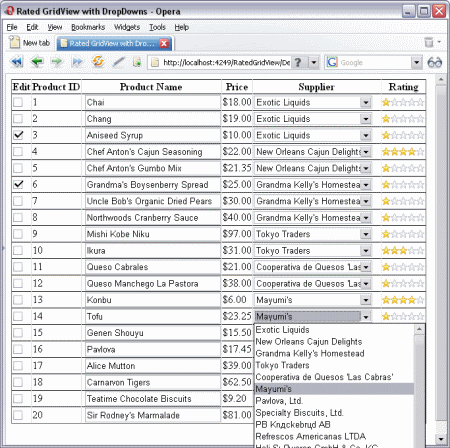
AJAX rating control using in Gridview
While browsing for answers through various ASP.NET blogs and forums, I often come across certain topics which repeat in one way or another.
This article is an exercise which answers some common GridView questions. In particular, here I am dealing with:
- MS Access database connectivity.
- MS AjaxControlToolkit's
Ratingextender, which is put on every row allowing the user to rate each row in real time. In other words, as soon as the user rates the row (chooses the number of stars), an asynchronous (AJAX) call to the server is made and the database is updated. - Data bound dropdownlists in each
GridViewrow. Each row has a supplier, which is displayed in a dropdown list in order to facilitate record modification. - JavaScript client-side row manipulation. In particular, on checkbox click, the Product textbox is locked/unlocked.
Click here for details ....
Sorting gridview bound with datatable
Protected Sub gvSorting(ByVal sender As Object, ByVal e As GridViewSortEventArgs)
dtData = CType(Session("Data"), DataTable)
Dim dv As DataView = dtData.DefaultView
Dim sortdirection As String
If ViewState("direction") <> "" Then
sortdirection = ViewState("direction")
If sortdirection = "asc" Then
sortdirection = "desc"
Else
sortdirection = "asc"
End If
Else
sortdirection = "asc"
End If
dv.Sort = e.SortExpression + " " + sortdirection
dtData = dv.ToTable
ViewState("direction") = sd
gvwList.DataSource = dtData
gvwList.DataBind()
End Sub
Sunday, January 31, 2010
TinyMCE - Javascript WYSIWYG Editor
TinyMCE is a platform independent web based Javascript HTML WYSIWYG editor control released as Open Source under LGPL by Moxiecode Systems AB. It has the ability to convert HTML TEXTAREA fields or other HTML elements to editor instances. TinyMCE is very easy to integrate into other Content Management Systems.


Friday, September 18, 2009
ASP.NET Dynamic Data
Dynamic Data Road Map
The ASP.NET Dynamic Data Preview 4 Refresh is a new release of Dynamic Data based on some of the early bits we are working on for the next release of the framework. This preview release runs on .NET 3.5 SP1 / VS 2008 SP1. The final version will ship with .NET 4.0 and VS 2010.
This preview shows some of the areas in which we are expanding Dynamic Data:
ASP.NET Dynamic Data MVC Preview contains a preview release of Dynamic Data MVC. This contains samples of how Dynamic Data support may be added to future releases of MVC.
ASP.NET Dynamic Data 4.0 Preview 4 Refresh
Refreshed 6/26
- DomainDataSource had errors updating foreign keys
- Cannot edit many to many relationship with table per type inheritance
- Better exception handling
The ASP.NET Dynamic Data Preview 4 Refresh is a new release of Dynamic Data based on some of the early bits we are working on for the next release of the framework. This preview release runs on .NET 3.5 SP1 / VS 2008 SP1. The final version will ship with .NET 4.0 and VS 2010.
This preview shows some of the areas in which we are expanding Dynamic Data:
- A new QueryExtender control, contained in the sample projects to simplify common data filtering operations. It supports a rich ASP.NET declarative query syntax that makes it easy to do things like search data for text or have filters based on ranges.
- A new Dynamic Data filter model that enables the developers to apply templates to pages just like field templates (including user defined filters).
- Support for inheritance in Entity Framework and Linq to SQL.
- Support for many to many relationships in Entity Framework.
- New Entity Templates which allow fine control over how an object is displayed and edited.
- Attributes for controlling the filters appearance and order.
- A DomainDataSource control that uses a data provider model which enables the developers to build their own custom business logic.
- A datasource control for ADO.NET Data Services that works with ASP.NET and an ADO.NET Data Service Provider for Dynamic Data.
- Starter templates for building new applications with the bits for DomainService, Entity Framework and Linq to SQL.
- Simple Dynamic Data for adding field templates, validation, and entity template support to existing ASP.NET data driven pages.
Download: ASP.NET Dynamic Data Preview 4 Refresh
This also contains the Dynamic Data Futures project which contains some things we the team is considering for future releases of Dynamic Data.ASP.NET Dynamic Data MVC Preview contains a preview release of Dynamic Data MVC. This contains samples of how Dynamic Data support may be added to future releases of MVC.
Subscribe to:
Comments (Atom)