Pages

Saturday, May 23, 2015

How to disable/enable copy paste in ASP.NET without scripting

Hey Guys!

Today, we will see that how to disable / enable the copy paste function in ASP.NET textbox without even using any scripting language.

So first of all, you need to create a test project in MS Visual Studio 2010, then follow the steps below:
  • Start > All Programs > Microsoft Visual Studio 2010
  • File > New Website > ASP.NET Empty Web Site (create your project on your desired location)
  • Right click on the solution explorer, select "Add New Item"
  • Place a ASP.Net control Textbox by drag and drop on the page under the <form> tags.
In order to disable / enable copy, paste and cut functions, use the following properties:

oncopy="return false"
onpaste="return false"
oncut="return false"

So, your markup page should be like this:

<%@ Page Language="VB" AutoEventWireup="true" CodeFile="Mytextbox.aspx.vb"  Inherits="Mytextbox"

 <!DOCTYPE html PUBLIC "-//W3C//DTD XHTML 1.0 Transitional//EN" "http://www.w3.org/TR/xhtml1/DTD/xhtml1-transitional.dtd">

<html xmlns="http://www.w3.org/1999/xhtml">
<head id="Head1" runat="server">
    <title></title>
</head>
<body>
    <form id="form1" runat="server">

    <div>
        <asp:TextBox ID="TextBox1" runat="server" oncopy="return false" onpaste="return false"
            oncut="return false">
        </asp:TextBox>
    </div>
    </form>
</body>


</html>
 Now, run the application on browser and test. Hope so this will be helpful to you.

Saturday, March 14, 2015

HTTP 2 Revoluation


1999: Bill Clinton was President of the United States; MySpace and Napster were founded; and the business world was preparing for the Y2K meltdown. It was also the year that that Hypertext Transfer Protocol 1.1 (http/1.1) was approved. All of us who use the Internet are familiar with http:// as the header to all our web-browsing experiences. It is the protocol that our browsers use to request content from a web server and display the corresponding web page on your screen. Web sites circa 1999 were much simpler in their design and sophistication. Http/1.1 was an evolution of the original http protocol, which was first used in 1991 by one of the pioneers of the Internet: Tim Berners Lee.

It goes without saying that a lot has happened in the intervening 16 years. Our web experiences today revolve around sites that are far more complex and serve much richer content to us; for example, YouTube, Facebook, Twitter. These were all invented after 1999 and have since ushered in a new era of digital content, accessible anywhere on any device. Streaming media, rich newsfeeds, interactive applications now abound on the web. The communication between a browser call and a web site has become exponentially more complex. Our expectations as consumers for lightning-fast responses to our web browsing has increased even faster.

Http/2 is now finally here and will provide a huge boost to browsing speeds. The new protocol is based on Google’s SPDY/2, the company’s effort to overhaul http/1.1, and developed by the Internet Engineering Taskforce (IETF).

So why the change? Well, http/1.1 only allows one pending request per open TCP connection requiring browsers to use multiple TCP connections to send requests to load a given web page. This process uses a lot of bandwidth and adds latencies which is a particularly acute issue in an age of multimedia and mobile browsing.

Http/2 is a binary protocol and is also fully multiplexed allowing browsers to make multiple http request/response messages in parallel with just one open TCP connection. This is the equivalent of being able to ask several questions at one time rather than asking each question serially. Importantly, http/2 also mandates compression to reduce data usage. For the end user, http/2 enables faster browsing, requires less bandwidth and makes secure connectivity easier. For web sites the beauty of the new protocol is that no change is required for returning a response to the http/2 request.

We are living in a world where 2.5 exabytes of data are created every day from connected devices.[1] Web pages that load faster and are more secure, up to 40 percent faster, are important for the future of every industry, including Visa’s. Today, 80 percent of payment transactions happen face-to-face, but that ratio is changing every day as more people browse and shop on their PC, tablet and, most importantly, smartphone. Growth of mobile commerce, for example, is three times that of offline commerce so new and better web experiences, including http/2 are well worth celebrating.

So the obvious question is: How do I enable http/2? The latest versions of Chrome and Firefox 36 currently support http/2, while Internet Explorer 11 will support it in the upcoming Windows 10 beta. To enable http/2 on Chrome, use Google Chrome Canary and/or go to chrome://flags/#enable-spdy4 to enable SPDY/4 (Chrome's name for http/2). To enable http/2 on Firefox, use Firefox Nightly or go to about:config and enable "network.http.spdy.enabled.http2".

What is perhaps most surprising about the new protocol is how little attention it has generated. Beyond the research papers I follow and some technology news sites, very little has been written about http/2, despite its significance. What are your thoughts on http/2 and its role in our increasingly connected, multimedia world?

Monday, October 15, 2012

Samsung extends lead over Apple in smartphone race: Reuters Poll

Thursday, April 26, 2012

Google Drive. Keep everything. Share anything.

Google Drive is everywhere you are – on the web, in your home, at the office and on the go. So wherever you are, your stuff is just...there. Ready to go, ready to share. Get started with 5 GB free.

Google Drive is available for:

PC and Mac
iPhone and iPad (coming soon)
Android devices

Things happen. Your phone goes for a swim. Your laptop takes an infinite snooze. No matter what happens to your devices, your files are safely stored in Google Drive.


Google Drive lets you do more than just store your files. Share files with exactly who you want and edit them together, from any device.

Google Drive gives you instant access to Google Docs, a suite of editing tools that makes working together better – even when your teammates are miles away.

Get started with 5 GB of free space. Upgrade to 25 GB for less than $2.50 a month and you can store practically everything for next to nothing.

Friday, February 24, 2012

Microsoft Visual Studio Light Switch 2011

Overview
Microsoft Visual Studio LightSwitch 2011 makes it simple for users of all skill levels to quickly build and deploy polished, user-friendly business applications that look like they were created by a professional designer.

Familiar and professional applications, coding optional
You can download one or more of the extensible, pre-built application shells—called starter kits—to help you give your application the look and feel of popular Microsoft software, like Office and Windows, without starting from scratch.

Desktop, web, or cloud—you choose
Create one application and deploy it to ensure the highest adoption and use by your users. LightSwitch lets you decide on a deployment method after your application is built, then writes the code to make it happen.

Build your first LightSwitch Application

Wednesday, January 11, 2012

Multiple Files Uploading using JQuery in ASP.NET

In this article, i tried to explain that how to upload multiple files using JQuery in as asp.net page. Also, you can check the file size and file size during the upload process and restrict the user.

Follow the below steps:

Step No. 1

You have to have the following files in and create the reference of these files in your header section of your page.

<head runat='server' ID='head1'>
    <title>Multiple Files Uploading</title>   
    <script src='Scripts/jquery-1.3.2.js' type='text/javascript'></script>
    <script src='Scripts/jquery.MultiFile.js' type='text/javascript'></script>
</head>

jquery.MultiFile.js can be download from here.


Step No. 2

Add a HTML file uploader control in your body section.

<input type='file' id='fluFile' runat='server' class='multi' accept='gif|jpg|png|bmp|jpeg' maxlength='5' />

<asp:Button ID='btnUpload' runat='server' Text='Upload All' />

class='multi' is shows that the user can select multiple files.
maxlength='5' is shows that the user can not select more than 5 files.
accept is shows that the mentioned file formats are allowed to upload.

Step No. 3

Place the following code on the button click event

Dim hfc As HttpFileCollection = Request.Files

            For i As Integer = 0 To hfc.Count - 1
                Dim hpf As HttpPostedFile = hfc(i)
                If hpf.ContentLength > 0 Then
                    If hfc.Item(i).ContentLength > 524288 Then
                        Throw New Exception('File size should not be more than 512KB')
                    Else
                        hpf.SaveAs(Server.MapPath('Files') & '\' & hpf.FileName)
                    End If
                End If
            Next

lblmsg.text = 'File(s) uploaded successfully'

The above code can be more precize and expandable as per your requirements like you can put up your own code to get file extensions and vaildate the file type and size during the uploading process.

Hope, it will work for you!

Monday, December 26, 2011

Free eBooks

The website that is gonna share with you is not allow to store any files on their server. They only indexes and links to the content provided by other sites.

You are now just a click a way to get your free eBooks.

Tuesday, October 26, 2010

Create Programmatically GridView Paging Style

Today, I am here to share with you a very useful technique of gridview paging style programmatically using vb.net shown below:

Protected Sub GridView1_RowDataBound(ByVal sender As Object, ByVal e As GridViewRowEventArgs)

If e.Row.RowType = DataControlRowType.Pager Then
Dim tRow As TableRow = TryCast(e.Row.Controls(0).Controls(0).Controls(0), TableRow)
For Each tCell As TableCell In tRow.Cells
Dim ctrl As Control = tCell.Controls(0)
If TypeOf ctrl Is LinkButton Then
Dim lb As LinkButton = CType(ctrl, LinkButton)
lb.Width = Unit.Pixel(15)
lb.BackColor = System.Drawing.Color.DarkGray
lb.ForeColor = System.Drawing.Color.White
lb.Attributes.Add("onmouseover", "this.style.backgroundColor='#4f6b72';")
lb.Attributes.Add("onmouseout", "this.style.backgroundColor='darkgray';")
End If
Next tCell
End If

End Sub

Saturday, September 4, 2010

Checking out jQuery Intellisense in Visual Studio 2008 with SP1

Assuming you have installed the hotfix , downloaded the jQuery library and the jQuery VS 2008 IntelliSense documentation, follow these steps to move ahead.

Open Visual Studio 2008 > File > New > Website > Choose ‘ASP.NET 3.5 website’ from the templates > Choose your language (C# or VB) > Enter the location > Ok. In the Solution Explorer, right click your project > New Folder > rename the folder as ‘Scripts’.

Right click the Scripts folder > Add Existing Item > Browse to the path where you downloaded the jQuery library (jquery-1.2.6.js) and the intellisense documentation (jquery-1.2.6-vsdoc.js) > Select the files and click Add. The structure will look similar to the following:


Now drag and drop the jquery-1.2.6.js file from the Solution Explorer on to your page to create a reference as shown below
:


Since you have applied the hotfix, you do not have to manually add a reference to the jquery-1.2.6-vsdoc.js file in your page. Once the reference to the runtime library has been added, Visual Studio automatically searches for the ‘vsdoc’ file and loads it. You just need to keep both the runtime library and the documentation file next to each other.

Monday, July 26, 2010

CMS Made Simple

CMS Made Simple is an open source ( GPL) package, built using PHP that provides website developers with a simple, easy to use utility to allow building small-ish (dozens to hundreds of pages), semi-static websites. Typically our tool is used for corporate websites, or the website promoting a team or organization, etc. This is where we shine. There are other content management packages that specialize in building portals, or blogs, or article based content, etc. CMS Made Simple can do much of this, but it is not our area of focus.

CMS Made Simple provides a mechanism for the website administrator to create and manage "pages", their layout, and their content. CMS Made simple is unobtrusive.... You can create a table based layout, or a fully validating XHTML/CSS layout.

Click here for more .....

Tuesday, June 22, 2010

Export GridView with Images to Word, Excel and PDF Formats

Export to Word Format

Private Sub Word_Export()

Response.Clear()
Response.Buffer = True
Response.AddHeader("content-disposition", "attachment;filename=GridViewExport.doc")

Response.Charset = ""
Response.ContentType = "application/vnd.ms-word "

Dim sw As New StringWriter()
Dim hw As New HtmlTextWriter(sw)

GridView1.AllowPaging = False
GridView1.DataBind()
GridView1.RenderControl(hw)

Response.Output.Write(sw.ToString())
Response.Flush()
Response.End()

End Sub


Export to Excel Format

Private Sub Excel_Export()

Response.Clear()
Response.Buffer = True
Response.AddHeader("content-disposition", "attachment;filename=GridViewExport.xls")

Response.Charset = ""
Response.ContentType = "application/vnd.ms-excel"

Dim sw As New StringWriter()
Dim hw As New HtmlTextWriter(sw)

GridView1.AllowPaging = False
GridView1.DataBind()

For i As Integer = 0 To GridView1.Rows.Count - 1
Dim row As GridViewRow = GridView1.Rows(i)
'Apply text style to each Row
row.Attributes.Add("class", "textmode")
Next

GridView1.RenderControl(hw)

'style to format numbers to string

Dim style As String = ""

Response.Write(style)
Response.Output.Write(sw.ToString())
Response.Flush()
Response.End()

End Sub


Export to PDF Format

Private Sub PDF_Export()

Response.ContentType = "application/pdf"
Response.AddHeader("content-disposition","attachment;filename=GridViewExport.pdf")
Response.Cache.SetCacheability(HttpCacheability.NoCache)

Dim sw As New StringWriter()
Dim hw As New HtmlTextWriter(sw)

GridView1.AllowPaging = False
GridView1.DataBind()
GridView1.RenderControl(hw)

Dim sr As New StringReader(sw.ToString())
Dim pdfDoc As New Document(PageSize.A4, 10.0F, 10.0F, 10.0F, 0.0F)
Dim htmlparser As New HTMLWorker(pdfDoc)

PdfWriter.GetInstance(pdfDoc, Response.OutputStream)

pdfDoc.Open()
htmlparser.Parse(sr)
pdfDoc.Close()
Response.Write(pdfDoc)
Response.End()

End Sub

Tuesday, March 16, 2010

How to Catch Unhandled Exceptions in ASP.NET Using Global.asax

Most of the time asp.net developers faces some exceptions in their applications / websites which came in some exceptional and rare cases. To handle them, we will do something new by using global.asax

Also add a new class file under the App_Code folder. In my case, my file name is Myglobal.vb, inherit this class file to HttpApplication.

Now, open the file and select the page event Error in MyGlobal.vb class file and write your code to handle the exception whether you want to log the error or redirect to the customized error page or whatever do you want, it is upto you.

Now add a global.asax file into your project, make sure the Application_OnError event should be written in global.asax file.

Open the file and add a page directive into global.asax like this i.e.

<%@ Application Language="VB" Inherits="MyGlobal" %>

MyGlobal is the name of my class file which i added into App_Code folder earlier.

Test your code.

Tuesday, February 23, 2010

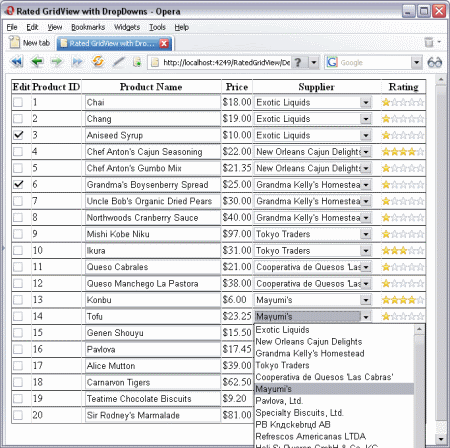
AJAX rating control using in Gridview

While browsing for answers through various ASP.NET blogs and forums, I often come across certain topics which repeat in one way or another.

This article is an exercise which answers some common GridView questions. In particular, here I am dealing with:

  1. MS Access database connectivity.
  2. MS AjaxControlToolkit's Rating extender, which is put on every row allowing the user to rate each row in real time. In other words, as soon as the user rates the row (chooses the number of stars), an asynchronous (AJAX) call to the server is made and the database is updated.
  3. Data bound dropdownlists in each GridView row. Each row has a supplier, which is displayed in a dropdown list in order to facilitate record modification.
  4. JavaScript client-side row manipulation. In particular, on checkbox click, the Product textbox is locked/unlocked.


Click here for details ....

Sorting gridview bound with datatable


Protected Sub gvSorting(ByVal sender As Object, ByVal e As GridViewSortEventArgs)

dtData = CType(Session("Data"), DataTable)
Dim dv As DataView = dtData.DefaultView
Dim sortdirection As String


If ViewState("direction") <> "" Then
sortdirection = ViewState("direction")
If sortdirection = "asc" Then
sortdirection = "desc"
Else
sortdirection = "asc"
End If
Else
sortdirection = "asc"
End If

dv.Sort = e.SortExpression + " " + sortdirection
dtData = dv.ToTable
ViewState("direction") = sd

gvwList.DataSource = dtData
gvwList.DataBind()


End Sub

Sunday, January 31, 2010

TinyMCE - Javascript WYSIWYG Editor

TinyMCE is a platform independent web based Javascript HTML WYSIWYG editor control released as Open Source under LGPL by Moxiecode Systems AB. It has the ability to convert HTML TEXTAREA fields or other HTML elements to editor instances. TinyMCE is very easy to integrate into other Content Management Systems.


Click here to get it now absolutely FREE !!!

Friday, September 18, 2009

ASP.NET Dynamic Data

Dynamic Data Road Map

ASP.NET Dynamic Data 4.0 Preview 4 Refresh

Refreshed 6/26

  • DomainDataSource had errors updating foreign keys
  • Cannot edit many to many relationship with table per type inheritance
  • Better exception handling

The ASP.NET Dynamic Data Preview 4 Refresh is a new release of Dynamic Data based on some of the early bits we are working on for the next release of the framework. This preview release runs on .NET 3.5 SP1 / VS 2008 SP1. The final version will ship with .NET 4.0 and VS 2010.

This preview shows some of the areas in which we are expanding Dynamic Data:
  • A new QueryExtender control, contained in the sample projects to simplify common data filtering operations. It supports a rich ASP.NET declarative query syntax that makes it easy to do things like search data for text or have filters based on ranges.
  • A new Dynamic Data filter model that enables the developers to apply templates to pages just like field templates (including user defined filters).
  • Support for inheritance in Entity Framework and Linq to SQL.
  • Support for many to many relationships in Entity Framework.
  • New Entity Templates which allow fine control over how an object is displayed and edited.
  • Attributes for controlling the filters appearance and order.
  • A DomainDataSource control that uses a data provider model which enables the developers to build their own custom business logic.
  • A datasource control for ADO.NET Data Services that works with ASP.NET and an ADO.NET Data Service Provider for Dynamic Data.
  • Starter templates for building new applications with the bits for DomainService, Entity Framework and Linq to SQL.
  • Simple Dynamic Data for adding field templates, validation, and entity template support to existing ASP.NET data driven pages.
Download: ASP.NET Dynamic Data Preview 4 Refresh
This also contains the Dynamic Data Futures project which contains some things we the team is considering for future releases of Dynamic Data.

ASP.NET Dynamic Data MVC Preview contains a preview release of Dynamic Data MVC. This contains samples of how Dynamic Data support may be added to future releases of MVC.

Friday, September 11, 2009

Take Control of your Web Site

Beezilla CMS website builder is a simple and powerful website content management system (CMS). With Beezilla CMS website builder you can easily create your website on your own.

Creating your website is simple and quick. Choose a website design from our template library or create your own custom template. Add pages to your website with a click of a button. Save some time and create your content using our visual elements library.

Beezilla’s CMS interface is simple, fast and easy to use. Our technology is based on leading web technologies: Apache, PHP, MySQL and ExtJS.

No more delays, no more expensive maintenance cost You can take control of your web site NOW. It's Free!!!

Click here for details .......

Saturday, September 5, 2009

How To Create MultiColum Dropdownlist using DropDownExtender Control

In this programming field a developer always facing a new requirement, need from their clients and as per the requirement new controls, tips and techniques developed.

Today, i am here to find out that how can we create a multi coloumn dropdown in asp.net

Visit the following link .....

AJAX CascadingDropdown Control SQL DataBinding

AJAX CascadingDropdown extender control provides the functionality to load the data in ASP.Net dropdown list controls using AJAX based web service methods. AJAX CascadingDropdown extender works with 2 or more Dropdownlist controls that enable you to load the primary data in first dropdown and further it populates the second Dropdown list control dynamically with related data on selected index change event of first dropdownlist.

All this functionality performs without refreshing the ASP.Net web page. In this sample we have used the Northwind SQL Database to load the category names in first Dropdownlist control that will populate the related products into the second dropdownlist control accroding to the category name selected.

Download the sample code .......

Click here for details .......